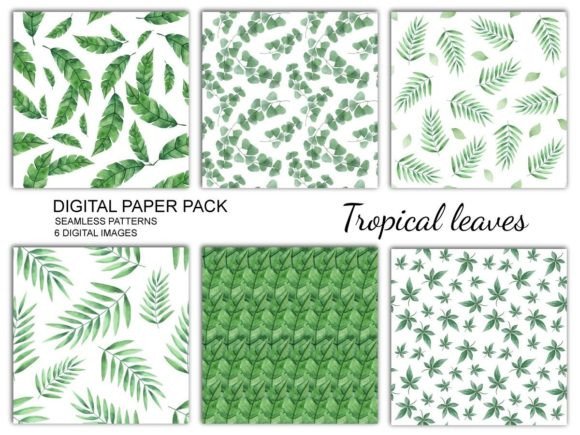
Tropical Leaves Digital Paper: A Versatile Resource for Creative Projects
If you're looking for a digital resource that can elevate your creative projects, Tropical Leaves is an excellent choice. This set of digital paper features tropical leaves painted in watercolor, offering a fresh and vibrant aesthetic that can be used in a variety of ways. Whether you're designing invitations, creating scrapbook layouts, or working on website graphics, this digital paper provides a natural and artistic touch that's both versatile and easy to use.
What You'll Get with Tropical Leaves
When you download the Tropical Leaves digital paper set, you'll receive a single zip file containing six PNG files with transparent backgrounds and six JPEG files with leaves on a white background. Each image is 3600 x 3600 pixels and printed at 300 DPI, ensuring high-quality results whether you're printing or using them digitally. No physical goods are shipped—this is a purely digital product that you can access and use immediately after downloading.
Real-World Applications of Tropical Leaves
The versatility of Tropical Leaves makes it suitable for a wide range of uses. Here are some practical examples of where and how you might use this digital paper:
- Scrapbooking and Digital Layouts: Use the transparent PNG files to add a natural backdrop to your scrapbook pages or digital layouts. The watercolor style complements photos and handwritten notes perfectly, giving your projects a warm and inviting feel.
- Website and Blog Design: Incorporate the leaf designs into your website headers, blog banners, or sidebar elements. The soft, organic look of the watercolor leaves can help create a more visually appealing and cohesive design.
- Invitations and Announcements: Create eye-catching invitations for weddings, birthdays, or parties by using the white-background JPEG files as a base. You can layer text and other graphics over the leaves to make your event announcements stand out.
- Business Cards and Stationery: If you run a small business or are an independent creator, consider using these leaves on your business cards, letterheads, or packaging materials. They add a unique and professional touch without being too flashy.
- DIY Crafts and Decor: For those who enjoy handmade crafts, the digital paper can be printed and used for decoupage projects, wrapping paper, fabric prints, or even furniture decoration. The leaves bring a sense of nature and relaxation to any space.
Who Can Benefit from Using Tropical Leaves?
Tropical Leaves is ideal for a variety of users, including creators, entrepreneurs, marketers, bloggers, educators, freelancers, publishers, hobbyists, and small business owners. Let’s explore how each group can benefit from using this digital paper:
Creators and Artists: Whether you're a graphic designer or an artist, having access to high-quality digital paper like Tropical Leaves can streamline your workflow. You can use it as a background, texture, or overlay in your digital art projects, saving time and effort.
Entrepreneurs and Small Business Owners: If you're running a boutique, café, or online store, incorporating Tropical Leaves into your branding can help create a unique and memorable identity. From packaging to marketing materials, the leaves add a personal and natural touch that resonates with customers.
Bloggers and Marketers: Bloggers can enhance their content with visually appealing headers or sidebars using these digital papers. Marketers can use them in social media posts, email campaigns, or promotional materials to grab attention and convey a sense of warmth and creativity.
Educators and Publishers: Teachers and educational content creators can use Tropical Leaves in lesson plans, worksheets, or children's books to make learning more engaging. Publishers can incorporate the designs into magazines, calendars, or other print materials for a fresh and inviting look.
Considerations Before Using Tropical Leaves
Before downloading and using Tropical Leaves, there are a few things to keep in mind. First, ensure that you understand the licensing terms and how you can legally use the digital paper. While the set is great for personal and commercial use, always check the specific rights included with your purchase.
Next, think about the resolution and size of the files. At 3600 x 3600 pixels and 300 DPI, these images are perfect for high-quality printing, but if you're using them for web-based projects, you may want to resize them to optimize loading times.
Also, consider the color palette and how it fits with your overall design. The watercolor style is subtle and elegant, so it works best when paired with complementary colors and fonts. Experiment with different combinations to find what looks best for your project.
Getting Started with Tropical Leaves
Once you've downloaded the zip file, you can start using the digital paper right away. Extract the files and open them in your preferred design software, such as Adobe Photoshop, Illustrator, or even free tools like Canva. You can also use them directly in your website builder or blogging platform if they support custom backgrounds or images.
If you're new to digital design, take some time to explore the different ways you can incorporate the leaves into your work. Try layering them behind text, adding them as textures, or using them as part of a larger collage. With a little experimentation, you'll find that Tropical Leaves can transform your projects and bring a new level of creativity to your work.
Whether you're a seasoned designer or just starting out, Tropical Leaves offers a simple yet powerful way to add a touch of nature and elegance to your creative endeavors. Its versatility, quality, and ease of use make it a valuable addition to any digital toolkit.